
Find Your PM Kisan Registration Number
What is the registration number?
Every farmer gets a registration number once their name is added to PM Kisan. You'll be asked for it for almost everything: checking your status, making a complaint, returning money, or changing your address or mobile number.
It usually starts with two English letters for your state, such as UP for Uttar Pradesh or BR for Bihar, followed by digits.
How to find it with your mobile or Aadhaar number
- Open the official website, pmkisan.gov.in, and tap Know Your Status under Farmers Corner.
- Tap the Know Your Registration No. button at the top of the page.
- Under Search By, choose Mobile Number or Aadhaar Number and type the number.
- Fill in the captcha and tap Get Mobile OTP.
- Enter the OTP sent to the mobile you gave PM Kisan. Your registration number and name will appear.
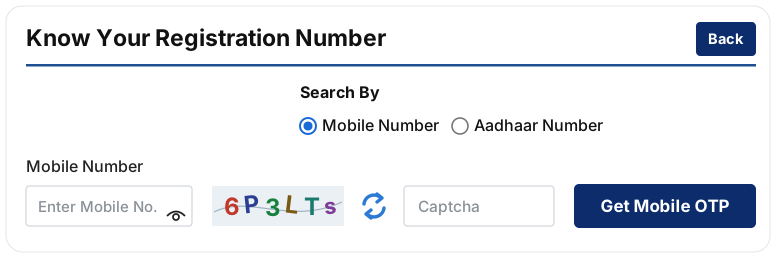
As soon as the number appears, take a photo of it or write it in a diary, so you never have to look it up again.
Other places to find your registration number
The easiest place is the SMS you got when you registered, which has the number in it. If you registered at a CSC, it's printed on the receipt too, and it shows in your details when you log in to the PM Kisan app. If you can't find it anywhere, take your Aadhaar to the agriculture office or a CSC and ask there.
Temporary ID or registration number?
A new application first gets a Temporary ID. That ID is used until the state government approves the application, and only after approval is the permanent registration number created.
- If your application is new or still waiting for approval, use the Temporary ID in forms such as a complaint.
- Once it has been approved, use the registration number.
Couldn't find it with your mobile number?
That usually comes down to one of these:
- PM Kisan has a different number on record, perhaps a family member's or the CSC operator's. Search with your Aadhaar number instead.
- The old number has been closed, so the OTP never arrives. Add your new number first. The steps are below.
- The application hasn't been approved yet, so there is no permanent number. Check how it is going under Status of Self Registered Farmer/ CSC Farmers.
How to change your mobile number in PM Kisan
When your old number stops working, everything that needs an OTP stops too. Add your new number like this:
- On pmkisan.gov.in, open Update Mobile Number under Farmers Corner.
- Choose Registration No. or Aadhaar No. and type the number.
- Fill in the captcha, tap Search, and follow the steps to add your new mobile number.
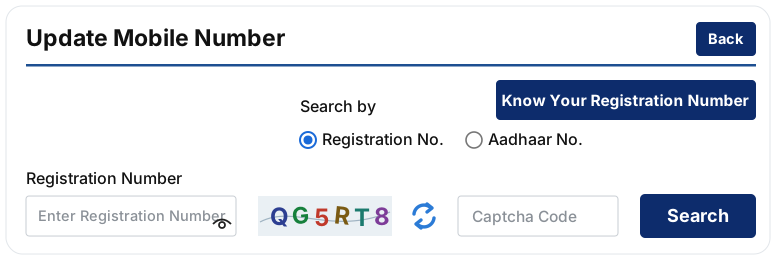
It's better still if the new number is linked to your Aadhaar, because then the eKYC OTP will come to it as well.
Once you have your registration number
- Check your status and look at all three items under Eligibility Status.
- If any of them says No, get your eKYC, land seeding or Aadhaar–bank seeding done.
- See when the next installment is due.
- You can also look for your name in your village's beneficiary list.
Common questions
Does the registration number ever change?
No. The number you get after approval stays the same, even if you change your mobile number or bank account.
Is it safe to share my registration number?
Most tasks, such as checking your status or making a complaint, need an OTP sent to your mobile as well as the number. So the thing to guard is the OTP. Never tell it to anyone.
Is this a government website?
No. Kisan Kisht is my own website. Your records are with the government, and only the government can change them.
Sources: pmkisan.gov.in