
PM Kisan eKYC
What is eKYC?
eKYC checks your identity against your Aadhaar, so the installment reaches the right farmer. Until it is done, your installments stay on hold. The PM Kisan website carries this notice on its front page:
“eKYC is MANDATORY for PMKISAN Registered Farmers. Biometric-based eKYC option is now available for CSC VLE Logins, PM-KISAN Mobile Application and State Authorized User Logins.”
In short: every registered farmer must complete eKYC, and the fingerprint option is now open at CSCs, in the PM-KISAN app and through authorised state officials.
Three ways to do eKYC
With an OTP
In the PM-KISAN app or at a Common Service Centre (CSC).
With your fingerprint
At a CSC, in the PM-KISAN app, or with an authorised state official.
With your face
From home, in the PM-KISAN app on your phone.
Any one of the three is enough. Pick whichever is easiest for you.
1. eKYC with an OTP
This is the quickest way, but it only works if your mobile number is linked to your Aadhaar, because that is where the OTP is sent.
- Open the eKYC option in the PM-KISAN app.
- Enter your Aadhaar number.
- Type in the OTP sent to your Aadhaar-linked mobile and submit.
- You will see a message once your eKYC goes through.
If no OTP arrives, your mobile is probably not linked to Aadhaar. Either get the number linked at an Aadhaar centre, or use one of the two methods below.
2. eKYC with your fingerprint (biometric)
This suits farmers whose mobile isn't linked to Aadhaar, or who find a smartphone hard to use. According to pmkisan.gov.in, fingerprint eKYC can be done at a CSC, in the PM-KISAN app, or with authorised state officials. For most people the nearest CSC is the simplest option:
- Take your Aadhaar card to your nearest Common Service Centre (CSC).
- The CSC operator enters your Aadhaar number in PM Kisan.
- Place your thumb or finger on the scanner. Once it matches, your eKYC is done.
The CSC may charge a small fee. If your fingerprint doesn't match, try the face method instead.
3. eKYC with your face (Face Authentication)
This lets you complete eKYC at home with your phone's camera.
- Install the government's PM-KISAN app and the AadhaarFaceRD app from the Google Play Store.
- Open the PM-KISAN app and log in with your registration number or Aadhaar.
- In eKYC, choose Face Authentication.
- Hold your face in front of the camera and blink when asked.
Scan your face in good light, take off glasses and caps, and hold the phone straight in front of your face.
If you don't have a smartphone, you can use a family member's or neighbour's phone for face eKYC in the PM-KISAN app. The only condition is that the farmer whose eKYC is being done is the one in front of the camera.
Common eKYC problems and how to fix them
| Problem | What to do |
|---|---|
| No OTP arrives | Your mobile isn't linked to Aadhaar, or the number is no longer active. Use the face or fingerprint method, or get your number linked at an Aadhaar centre. |
| The OTP is rejected | An OTP is valid for only a few minutes. Request a new one and enter it quickly. |
| Aadhaar record not found | This Aadhaar isn't linked to your PM Kisan record, or the wrong Aadhaar number went into your application. Get the record corrected at the block agriculture office or a CSC. |
| Fingerprint doesn't match | Clean and dry your finger and try other fingers. If it still fails, use face eKYC, or update your biometrics at an Aadhaar centre. |
| Face scan doesn't work | Improve the light, remove your glasses, and keep the AadhaarFaceRD app updated. If it still fails, do fingerprint eKYC at a CSC. |
| Name doesn't match Aadhaar | Your name in PM Kisan is written differently from your Aadhaar. Get it corrected at the agriculture office, then do your eKYC. |
How to check whether your eKYC is done
- Open Know Your Status on pmkisan.gov.in.
- Enter your registration number and the captcha, press Get OTP, then enter the OTP.
- Look at eKYC Status under Eligibility Status. Yes means your eKYC is done. No means it is still pending.
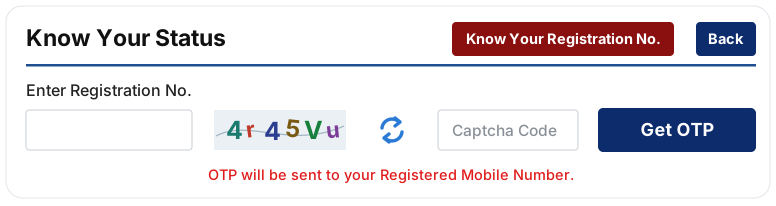
After you complete eKYC, it can take a little while for the status to change to Yes.
eKYC is done, but the installment still hasn't come
eKYC is one of three things every installment needs. The other two must be complete as well:
- Land seeding links your land record to PM Kisan. How to check and get it done
- Aadhaar–bank (NPCI) seeding links your Aadhaar to your bank account for DBT. How to check and get it done
Common questions
What if my eKYC won't go through?
First check whether your mobile number is linked to Aadhaar. If the OTP route fails, try your face, or get it done with your fingerprint at a CSC. If none of these work, speak to your block agriculture office.
When will my held-up installment arrive after eKYC?
Land seeding and the Aadhaar–bank link must be complete too. Once all three are in place, you receive the next installment. For older installments that were held back, ask your block agriculture office. Check your status.
Someone called and asked for my OTP. What should I do?
Never share an OTP. eKYC happens only in the PM-KISAN app or in front of you at a CSC. Anyone asking for an OTP over a call or WhatsApp in the name of eKYC is likely a fraudster.
I don't know my registration number.
Is this a government website?
No. Kisan Kisht is my own website. Your records are with the government, and only the government can change them.
Sources: pmkisan.gov.in, PIB (pib.gov.in)